

Online Help
Check In Command
Checks selected files (and/or files in selected directories) files back to the remote server. This will copy local files to the remote server, and (if the Keep checked out option is not specified) mark these files as checked in. It will also change the protection of local copies of the files to read-only. Only the user who checked out the selected files will be allowed to use this command.
Default ShortcutCTRL + I
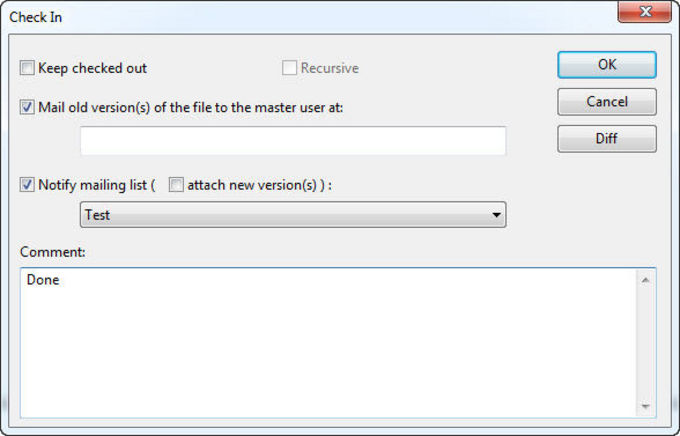
Dialog Box Options
Keep checked outChoose this option if you want to keep file(s) checked out after a check in.
Recursive
Choose this option if you want to check in directories with all their subdirectories. This option is enabled only if at least one directory is selected.
Mail old version of the file to the master user at
Choose this option if you want to send a notification message with the previous version of the file being checked in to the master user. See Sending Mail Settings for help on setting up a SMTP server needed to send email from FtpVC.
Mail notification to the mailing list
Choose this option if you want to send a notification message to the selected mailing list. See Mailing Lists Settings for help on setting up FtpVC mailing lists. Select "Attach new version(s)" to attach new version(s) of checked in file(s) to the notification.
Comment
Type your comment text here.
Diff
Show the differences between the file being checked in and the remote file. This button is enabled only if a single file is selected.
Copyright © 1997-2024 PrestoSoft LLC. All rights reserved.