

Online Help
Binary Comparison Options
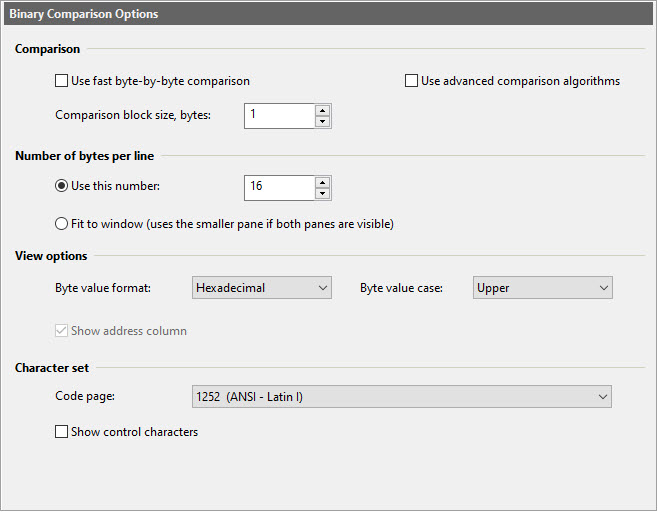
Dialog Box Options
Comparison- Use fast byte-by-byte comparison
When this option is enabled, ExamDiff Pro will simply compare each byte of one file with the corresponding byte of another file, rather than executing the diff algorithm. In this mode, there will be no offsets for matching blocks of bytes and ExamDiff Pro will only detect changed, rather than added or deleted blocks (except for the last blocks of files - if they have different sizes). Byte-by-byte comparison also optionally shows the hexadecimal memory addresses of each row of bytes.
- Use advanced comparison algorithms
Use this option to control whether binary comparison uses advanced (other than Classic) comparison algorithms set in Text Comparison - Advanced Options.
- Comparison block size
Minimal difference block size, in bytes. The bigger the number, the faster and less accurate the comparison. The most accurate binary comparison is performed when the block size is 1 byte. However, if you are comparing large files, comparison may take such a long time that it would make sense to sacrifice some precision for better performance. This option is not available with fast byte-by-byte comparison.
- Use this number
Use the specified number of bytes per line.
- Fit to window
Change the number of bytes per line to always fit the current screen or print area width.
- Byte value format
Specify the byte value format to be used in the left part of binary display.
- Byte value case
Specify the byte value case to be used in the left part of binary display. This option Only effects hexadecimal format.
- Show address column
Show or hide the hexadecimal address column. This option is only available with fast byte-by-byte comparison.
- Code page
Select the code page that will be used to display byte codes on the right side of the views. The list represents all single-byte code pages installed in your Windows operating system.
- Show control characters
Display control characters (with values 1...31 for the ASCII page) while showing byte codes. Otherwise, display the '.' character.
- EBCDIC
Use the EBCDIC character set to display byte codes.
Copyright © 1997-2024 PrestoSoft LLC. All rights reserved.