

Online Help
Update Available Dialog
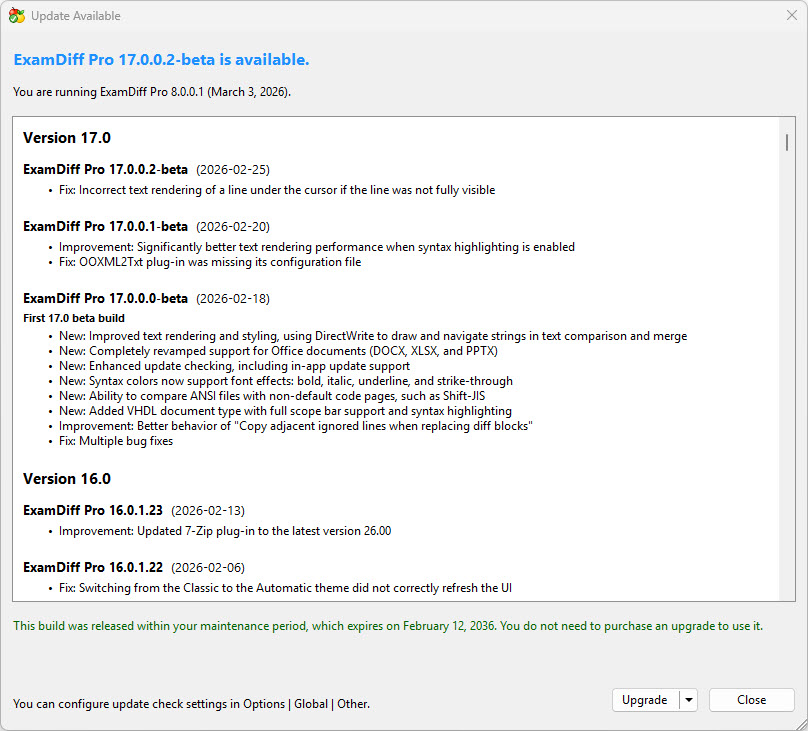
Dialog Box Options
ExamDiff Pro Update Information- Update notification
This section informs you that a new version of ExamDiff Pro is available and displays the version number.
- Current version details
Shows the version and build number of the ExamDiff Pro instance you are currently running, along with the build date.
- Changes
Displays a scrollable list of new features, improvements, and bug fixes included in versions newer than the one you are using.
- Maintenance period notice
Indicates whether the new version is covered by your maintenance period. If not, you will be informed that an upgrade purchase is required.
- Upgrade
Downloads and installs the new version silently using default settings. As part of the installation process, any open ExamDiff Pro windows will close, and you will be prompted to save any unsaved file changes. Clicking the drop-down arrow on the right side of the Upgrade button reveals an additional option:
- Custom Upgrade...
Launches the installer in interactive mode, allowing you to choose custom installation settings such as the installation folder and components before proceeding with the upgrade.
- Custom Upgrade...
- Close
Closes the dialog without taking any action.
- You can configure update check settings in Options | Global | Other.
Copyright © 1997-2026 PrestoSoft LLC. All rights reserved.