

Online Help
Undo Check Out Command
Undoes the check out of selected files (and/or files in selected directories) on the remote server. This will copy files from the remote server into a local directory to which the check out occurred (if the Replace local files option is specified), change the status of the files on the remote serve to 'checked in', and change the protection of local copies of the files to read-only. Only the developer who checked out the selected files can this command.
Default ShortcutCTRL + U
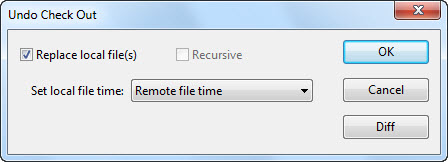
Dialog Box Options
Replace local filesChoose this option if you want to copy files from the remote server into a local directory to which the check out occurred.
Recursive
Choose this option if want the operation to be performed on subdirectories of directories. This option is enabled only if at least one directory is selected.
Set local file time
Select whether you want the local file time to be the time of the operation (current time), the remote file time, or the time of the current version (when the file was added or checked in). This option is enabled only if Replace local file(s) is selected.
Diff
Shows the differences between the file for which check-out is being undone and the remote file. This button is enabled only if a single file is selected.
Copyright © 1997-2024 PrestoSoft LLC. All rights reserved.