

Online Help
Settings Command - Mailing Lists
This dialog modifies FtpVC settings. Use the Export to file and Import from file commands to save and load the settings. This may be useful if all team members want to have the same FtpVC settings.
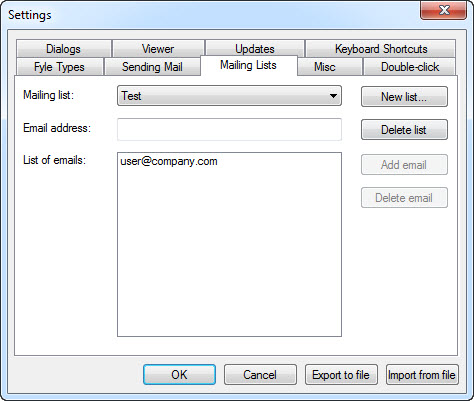
Dialog Box Options
New listAdds a new mailing list. New Mailing List Dialog is displayed after this button is pressed.
Delete list
Deletes the selected mailing list.
Add address
Adds an email address to the list. This button is enabled when an email address is entered.
Delete address
Deletes the selected email address from the list. This button is enabled when a list item is selected.
Copyright © 1997-2024 PrestoSoft LLC. All rights reserved.