

Online Help
Properties Command
Use this command to show properties of the selected file. There are two tabs in the Properties dialog: General and Subscriptions.
Default ShortcutALT + Enter
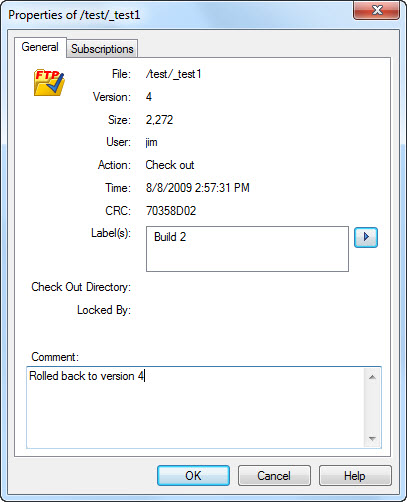
General tab looks as follows:
Dialog Box Options
FileComplete path on the remote server.
Version
File version.
Size
Size of the file version, in bytes.
User
Name of the user who performed the last action on the file.
Action
The last significant action on the file.
Time
Time of the last significant action on the file.
Size
CRC of the file version.
Label(s)
Label(s) of the latest file version. Here you can also add, delete, or modify labels: use the arrow button next to the label list to show the menu of commands. Keyboard commands are also supported when keyboard focus is in the label list: Insert for adding, Delete for deleting and F2 for modifying. If your new label collides with one that is used for any version of the file, a message box will be shown.
Check Out Directory
Directory on the local computer where the file is checked out (if it is checked out).
Locked By
Name of the user who locked the file (if the file is locked).
Comment
Comment used with the last significant action on the file. This is the only field that you are allowed to edit on the File Properties Page.
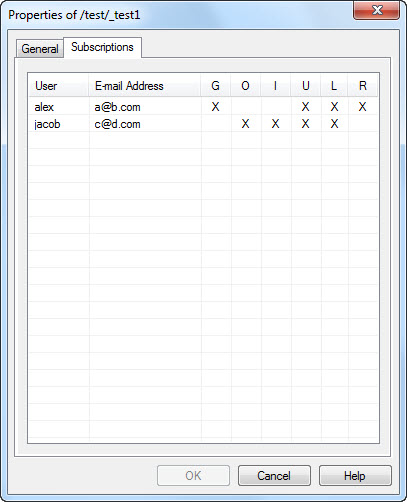
Subscriptions tab looks as follows:
Dialog Box Options
User columnNames of users subscribed to the file's version control events.
Email Address column
Email addresses of users subscribed to the file's version control events.
G, O, I, U, L, and R columns
Version control events (G - Get, O - Check Out, I - Check In, U - Undo Check Out, L - Label, and R - Rollback), to which users are subscribed (marked with an X).
Copyright © 1997-2024 PrestoSoft LLC. All rights reserved.