

Online Help
Project Options Command - Startup
This dialog specifies project options. Options are saved for the selected project; user names and passwords are not saved. If no FTP connection is established, use the Project Options panels to modify options for the default project. Use the Export to file and Import from file commands to save and load project options. This may be useful if all team members want to have the same project options.
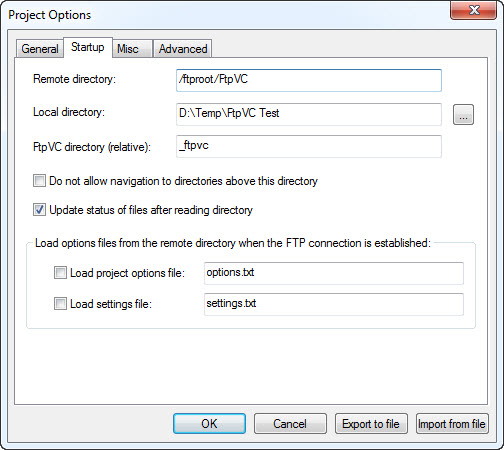
Dialog Box Options
Remote directoryEnter the path to the initial directory on the FTP server.
Do not allow navigation to directories above this directory
This option prevents FtpVC from navigating to directories located above the project's initial directory. This option is convenient if your project is buried several levels deep in a directory tree and you don't want to accidentally select a higher directory and cause FtpVC to read its file listing.
Local directory
Enter the path to the initial local directory (i.e. directory on your computer). Use Browse Button to browse for a local directory.
FtpVC directory
Enter the path to the directory (relative to the remote directory) where FtpVC files (stubs and previous versions of remote files) will be stored.
Update status of files after reading directory
Choose this option if you want file statuses to be updated after reading a directory on the FTP server. Disabling this option makes reading an FTP directory faster for slow Internet connections (because stubs aren't loaded), and file statuses can be updated later by using the Refresh or Refresh Selected commands.
Load options files from the remote directory when FTP connection is established
Choose this option if you want FtpVC to automatically update project options and FtpVC settings as soon as the FTP connection is established.
Note: you don't have to have every option or setting in your files. You can export your options or settings to a file, then delete some lines, or comment them out with the ';' character in the first position, and then save the file (using any FTP client, or FtpVC itself) in the root directory of your project. Only lines that exist in the files and are not commented out will be loaded.
- Load project options file
Choose this option if you want FtpVC to load the specified project options file.
- Load settings file
Choose this option if you want FtpVC to load the specified settings file.
Note: if the files forceloadoptions.txt and/or forceloadsettings.txt exist in the FTP server root directory, they will be loaded even if the Load project options file or Load settings file options are not checked.
Copyright © 1997-2024 PrestoSoft LLC. All rights reserved.