

Online Help
Global - General Options
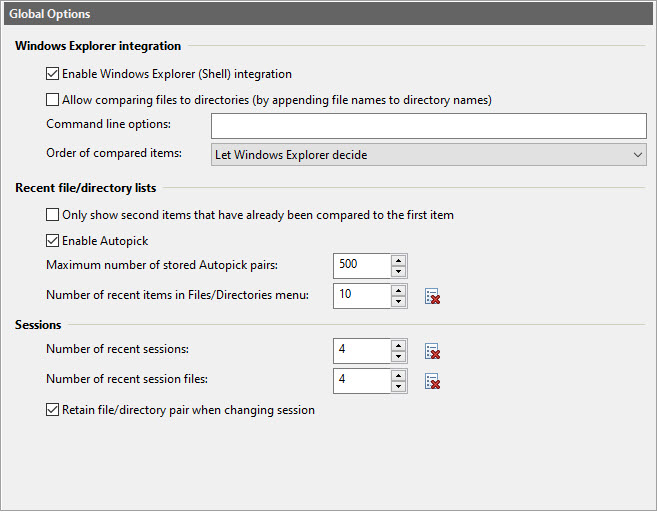
Dialog Box Options
These options apply to all sessions.
Windows Explorer integration- Enable Windows Explorer (Shell) integration
This option adds ExamDiff Pro menu items to file and directory context (right-click) menus in Windows Explorer. If one file or directory is selected, ExamDiff Pro context menu items will allow you to chose the selected file/directory as the first item for further comparison, to compare it with the previously selected file/directory, or to open ExamDiff Pro and browse for the second file/directory to compare. If two files/directories are selected, you will be able to compare them by using the ExamDiff Pro context menu item with one click.
In 32-bit systems, ExamDiff Pro installs a 32-bit Shell extension. In 64-bit systems, ExamDiff Pro installs both 32-bit and 64-bit Shell extensions.
Under Windows Vista or higher, if you not running as administrator, you will be presented with the standard User Access Control message asking you to confirm this change. In 64-bit systems this message will be presented twice, once for each Shell extension.
- Allow comparing files to directories (by appending file names to directory names)
Select this option if you want to be able to compare files to directories (ExamDiff Pro will silently append the file name to the directory name, and then compare the two files).
- Command line options
Command line options used for starting ExamDiff Pro from the Shell extension.
- Order of compared items
Use this option to force ExamDiff Pro to choose older or newer file/directory to be compared as the first (left) item. By default ExamDiff Pro will use the order determined by Windows Explorer.
- Only show second items that have already been compared to the first item
This option causes only items that have been previously compared to the first item to be shown in the bottom drop-down box in the Compare dialog.
- Enable Autopick
This option enables the Autopick feature: the ability to remember file and directory pairs after they are compared, and to automatically select the second item based on the first one in the Compare dialog. This feature also keeps track of the last time that every pair of files or directories is compared, and displays it in the status bar of the Compare dialog.
- Maximum number of stored Autopick pairs
Maximum number of file/directory pairs stored by ExamDiff Pro.
- Number of recent items in Files/Directories menu
Use this option to control how many recent items are displayed in the Recent Files/Directories sub-menu in the Files/Directories menu.
The Clear button,
or the Files/Directories | Recent Files/Directories | Clear Recent Files/Directories List menu command,
deletes all stored recent files/directories.
Clear button,
or the Files/Directories | Recent Files/Directories | Clear Recent Files/Directories List menu command,
deletes all stored recent files/directories.
Note that this list of recent files and directories is identical to the Recent list in the ExamDiff Pro jump list, which you can access by right-clicking the ExamDiff Pro icon in the taskbar:
- Number of recent sessions
Sets the number of recent sessions displayed in Files/Directories | Sessions menu.
The Clear button,
or the Files/Directories | Sessions | Recent Sessions | Clear Recent Session List menu command,
deletes all stored recent sessions.
- Number of recent session files
Sets the number of recent session files displayed in Files/Directories | Sessions menu.
The Clear button,
or the Files/Directories | Sessions | Recent Session Files | Clear Recent Session File List menu command,
deletes all stored recent session files.
- Retain file/directory pair when changing session
This option causes the current file/directory pair to be retained when you change sessions in the Compare dialog. When this option is disabled, as it is by default, the file/directory pair changes to the most recent pair of the session that you select.
Copyright © 1997-2024 PrestoSoft LLC. All rights reserved.